Plugear Review Step for Contact Form 7 adds a confirmation step — enter, review, send — to your Contact Form 7 forms. There is no second form to keep in sync and no confirmation page to create. It is distributed free on WordPress.org, with no purchase and no license key.
This page describes version 1.0.0.
Overview
Contact Form 7 sends a message the moment the visitor presses submit. There is no chance to look at what was typed, so typos go out as they are and the same message is sometimes sent twice. This plugin puts a confirmation step in between: the visitor presses the button, sees the values they entered, and only then sends.
The confirmation is not a separate panel. Each input is replaced in place by the value that was typed, so labels, table rows, fieldsets and every bit of markup you wrote stay exactly where they were. A form laid out in a table stays a table. A two-column layout stays two columns.
What it does
- Turns the confirmation step on or off per form — one form, one shortcode, nothing to add to the form template
- Lets you set the wording of the Confirm, Edit and Send buttons per form
- Optionally shows a placeholder for fields the visitor left empty
- Optionally scrolls to the top of the form when entering and when leaving the confirmation
- Converts full-width letters, digits and spaces to half-width when the confirm button is pressed
- Shows validation errors with Contact Form 7's own markup and accessibility wiring
The confirmation step never sends mail and never runs a spam check. It runs Contact Form 7's own validation rules on the server and returns the result — nothing else. When the visitor presses Send, Contact Form 7's normal submission runs exactly once.
Requirements
| Item | Requirement |
|---|---|
| WordPress | 6.0 or later |
| PHP | 7.4 or later |
| Contact Form 7 | 5.7 or later (required) |
| Tested up to | WordPress 7.0 |
| License | GPLv2 or later |
When Contact Form 7 is missing, inactive, or older than 5.7, this plugin registers nothing at all and only shows a notice in wp-admin. Your forms keep working as plain Contact Form 7.
Multisite is outside what this plugin is verified against. Activation is not blocked, but the behaviour there has not been tested.
Interface language
This plugin ships no translation files. Translations for WordPress.org plugins are delivered by translate.wordpress.org, so the plugin's own strings appear in English until a translation for your locale has been contributed and approved there.
The wording your visitors see — the Confirm, Edit and Send buttons and the placeholder for empty fields — is not affected by that. Those are per-form settings you type in yourself, in any language, from the first day.
Installing the plugin
- Install and activate Contact Form 7 (5.7 or later) first.
- In wp-admin, go to Plugins → Add New and search for “Plugear Review Step for Contact Form 7”, then install it.
- Activate it on the Plugins screen.
On WordPress 6.5 and later this plugin declares Contact Form 7 as a dependency, so WordPress blocks activation until Contact Form 7 is active, and it will not let you deactivate or delete Contact Form 7 while this plugin is active.
WordPress 6.0 to 6.4 ignore that header, so on those versions the only sign is this plugin's own admin notice.
A version header cannot express a minimum version, so Contact Form 7 5.6 still passes WordPress's dependency check. In that case this plugin detects it, stops loading its features, and the notice tells you both the version required and the version you have.
Quick start
- Open Contact → Contact Forms and edit the form you want a confirmation step on.
- Open the Confirm Screen tab and tick Show a confirmation step before sending.
- Set the button wording if you want to, and Save.
That is all. Nothing in the form template has to change. The form on your site now shows a confirmation step.
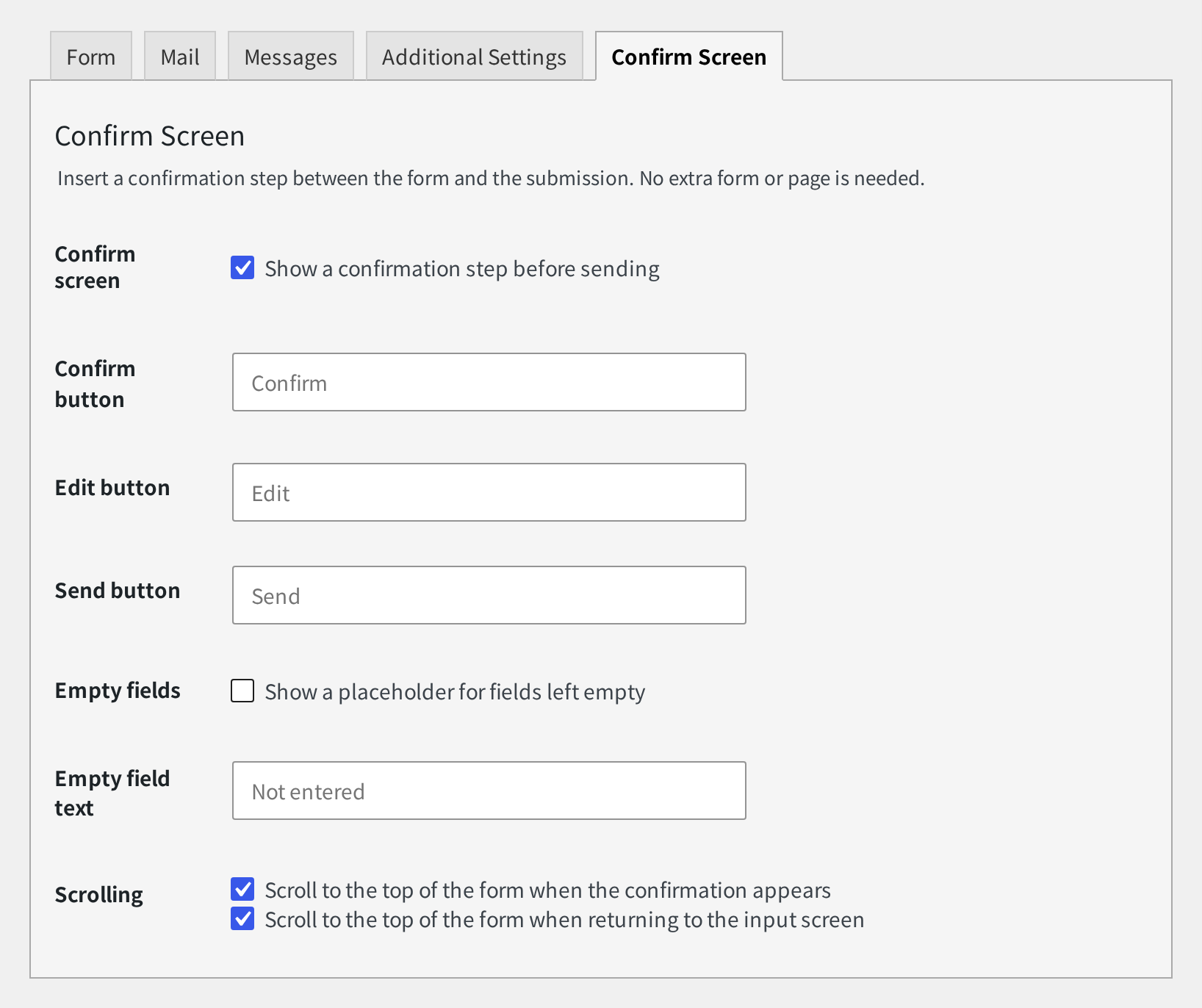
The Confirm Screen tab
Every setting is per form, and it travels with the form when you duplicate it. The plugin adds no admin menu of its own — there is no site-wide settings screen.
| Setting | What it does | Default |
|---|---|---|
Confirm screenShow a confirmation step before sending |
Use the confirmation step on this form | Off |
| Confirm button | Wording of the submit button on the input screen (the button that goes to the confirmation) | Empty (Confirm) |
| Edit button | Wording of the button that returns to the input screen | Empty (Edit) |
| Send button | Wording of the button that sends from the confirmation | Empty (Send) |
Empty fieldsShow a placeholder for fields left empty |
Show something in fields the visitor left empty | Off |
| Empty field text | The text shown for an empty field | Empty (Not entered) |
ScrollingScroll to the top of the form when the confirmation appears |
Scroll to the top of the form when entering the confirmation | On |
ScrollingScroll to the top of the form when returning to the input screen |
Scroll to the top of the form when going back to the input screen | On |
Leave a button field empty and the translated default is used at display time
(Confirm / Edit / Send / Not entered), so the
wording follows the language instead of being frozen at the moment you saved. Labels are limited
to 100 characters.
Because inputs are replaced in place, a row for an empty field cannot be removed — its label lives in your own markup, not in anything this plugin renders. Empty fields is therefore a choice between showing a recognisable placeholder and showing nothing at all.
What the visitor sees
On a form with the confirmation step turned on, the submit button carries the wording from
Confirm button (Confirm by default). When the visitor presses it, the
values are validated on the server and, if everything is in order, the form switches to the
confirmation.
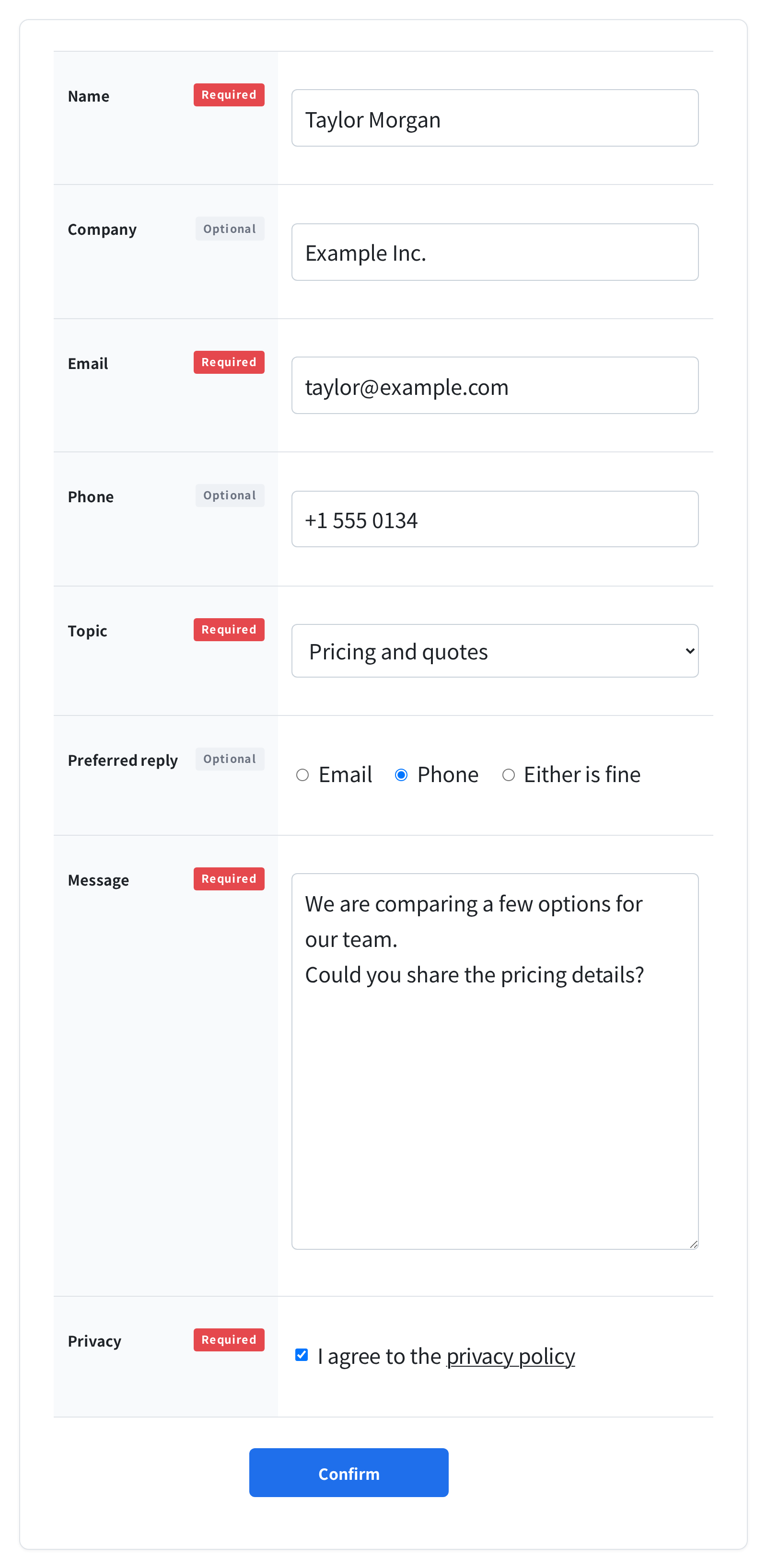
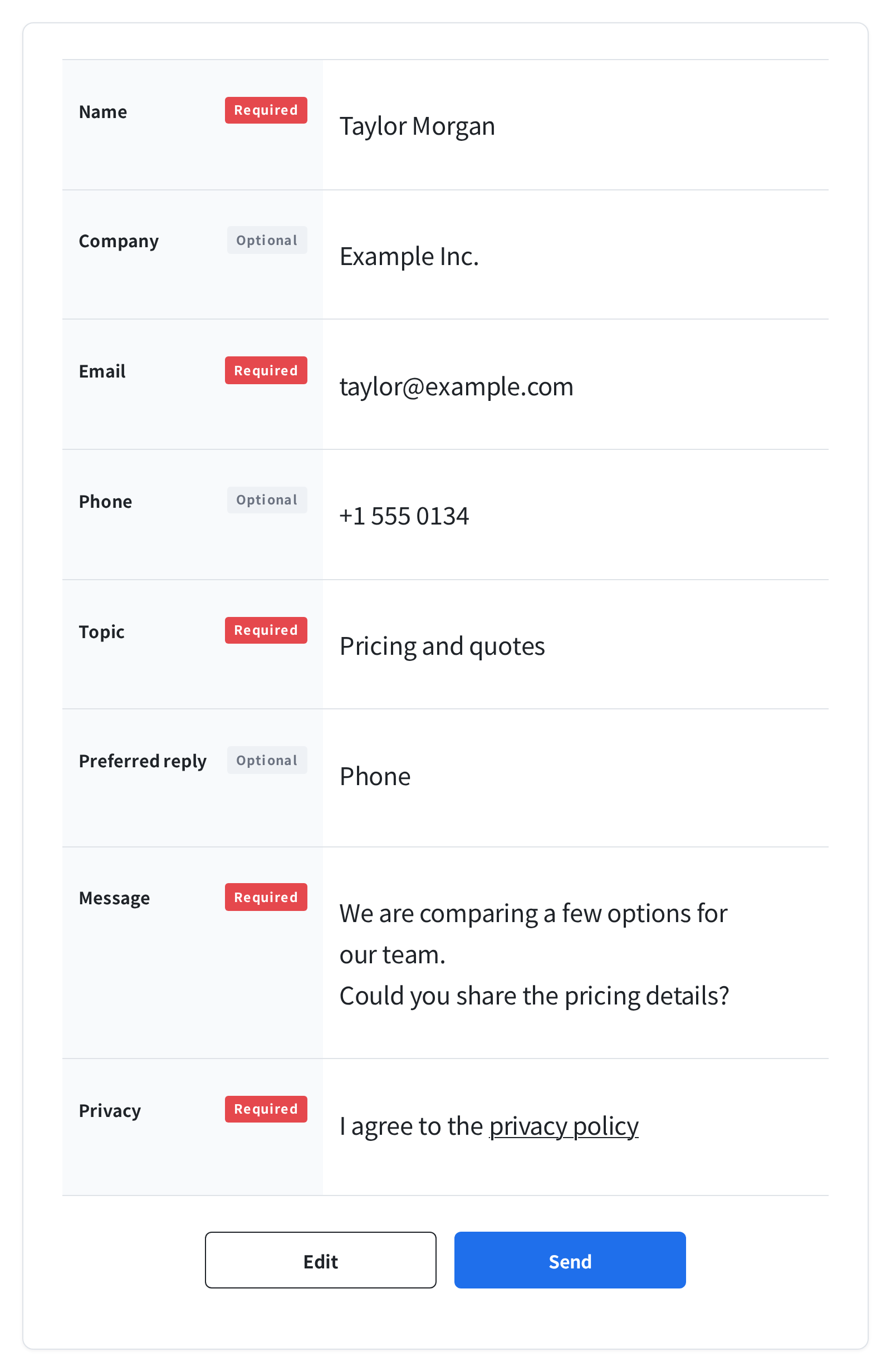
How the confirmation is built
- Only the input controls themselves are replaced. Labels, table rows, fieldsets and any nesting your theme adds are left untouched
- Inputs are hidden, not removed, so no value is lost from the final submission
- The Edit and Send buttons are cloned from your existing submit button, so they inherit whatever your theme gives it
- The original submit button is hidden rather than removed, so your theme's markup stays intact
- Pressing Edit undoes every change made for the confirmation, including any error display
How each field type appears
| Field | On the confirmation |
|---|---|
| Text, email, tel, URL, textarea and similar | The value that was typed. Line breaks are preserved |
| Checkboxes and radio buttons | The label text of the chosen options; unchosen options are hidden row and all |
Acceptance ([acceptance]) | If it is ticked, the consent wording stays visible as it is |
Drop-down ([select]) | The visible text of the selected options; options with an empty value are ignored |
File ([file]) | The file name that was chosen. The file itself is uploaded with the final submission as usual |
| Password | One • per character; the value is not shown |
| Hidden fields and submit buttons | Not shown on the confirmation |
Fields left empty
With Empty fields off, an empty field shows nothing — only its label remains.
With it on, the wording from Empty field text (Not entered by default)
is shown instead.
When something is invalid
Validation happens on the server when the confirm button is pressed. If something is invalid the form does not move on; the errors appear where they are.
- Messages appear in the same place, with the same markup and the same attributes Contact Form 7 uses itself, so your theme's styling for form errors keeps working
- The summary message is the one configured on the form in Contact Form 7 (its validation error message)
- Focus and scrolling move to the first field with an error
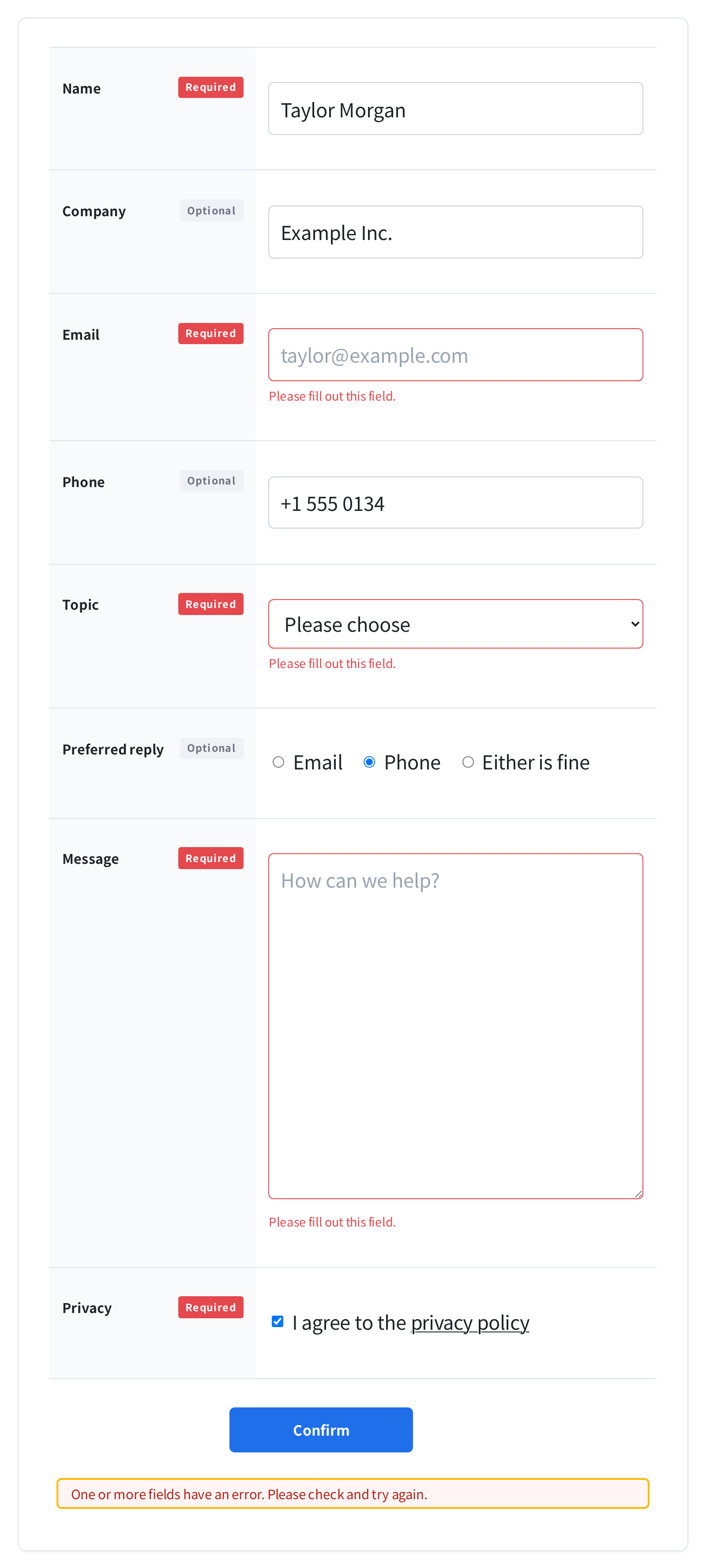
If the request fails, or the confirmation cannot be produced for some other reason, no wording from the sending context is shown — nothing has been sent yet. A dedicated message is used instead: “The confirmation screen could not be displayed. Please try again in a moment.”
Acceptance ([acceptance]) and Really Simple CAPTCHA ([captchar]) are
not validated at the confirmation step. Consent is the act of sending, so it is not judged
before the visitor has decided; and validating the CAPTCHA here would consume it and make the
real submission fail. Both are validated as usual when the message is sent.
Converting full-width characters
On a Japanese phone keyboard, typing a number produces full-width digits
(090…). A phone number entered that way is rejected by Contact Form 7's own
validation, and the visitor is sent back to retype it without being told why.
This plugin converts full-width letters, digits, punctuation and spaces to half-width at the moment the confirm button is pressed — never while the visitor is typing, which would break Japanese input mid-conversion. Kana and kanji are left alone.
The input itself is rewritten, so the confirmation, the submitted value and the mail you receive all carry the same value.
Which fields are converted
By default, form tags whose type is tel, number, email or
url. Any other field can opt in — and any default one can opt out — with an option on
the form tag.
[text* your-zip hankaku]      … opt in
[tel your-tel hankaku:off]    … opt out
[number] is the one exception. The browser itself discards full-width digits from
an input[type=number] before any script can see them, so there is nothing left to
convert. For numeric values that may be typed full-width, use [text] with the
hankaku option.
The mail and other plugins
The confirmation step never enters Contact Form 7's submission flow. At that stage
no mail is sent, no spam check is charged, and none of the wpcf7_* submission
hooks fire. Other plugins that act on a submission cannot be triggered twice.
When the visitor presses Send, Contact Form 7 runs its normal submission exactly once. The mail you receive is the same mail you would have received without this plugin.
| Question | Answer |
|---|---|
| reCAPTCHA, Turnstile, Akismet | They run at the spam-check stage, which the confirmation step does not enter at all. They do their usual work when the message is actually sent |
| File uploads | The confirmation shows the file name; the file is uploaded with the final submission as usual |
| Duplicating a form | The confirmation settings are duplicated along with the form |
| JavaScript unavailable | The confirmation step is skipped and the form behaves like plain Contact Form 7 — the message is still delivered |
| Page caching | If Contact Form 7 re-initialises the forms when a cached page loads, the confirmation returns to the input screen |
Styling the confirmation
Most of the confirmation is your own markup, already styled by your theme. For the parts this plugin adds, style these classes.
| Class | Where it lands |
|---|---|
plg_prscf7_confirming | The .wpcf7 wrapper while the confirmation is shown |
plg_prscf7_value | The element holding a displayed value |
plg_prscf7_actions | The container around the Edit and Send buttons |
plg_prscf7_back | The Edit button |
plg_prscf7_send | The Send button |
Only three rules ship as CSS. Colour, fonts and spacing are left to your theme.
- The gap between the Edit and Send buttons
- A secondary look for the Edit button — background removed, a border drawn in the current text colour, so no palette is imposed on your theme
- Hiding Contact Form 7's spinner while the confirmation is shown
To override the Edit button's look, write a selector at least as specific as
.wpcf7 .plg_prscf7_actions .plg_prscf7_back, or use !important. You can
also drop the bundled stylesheet entirely with the plg_prscf7_load_css filter below.
Accessibility
- Entering and leaving the confirmation is announced through Contact Form 7's own
role="status"region. It is not shown visually — for sighted visitors the change of display is the signal - Focus moves to the top of the form at the same time, so it does not fall to the document when the pressed button is hidden. It does not join the Tab order
- Errors use the same two-part wiring as Contact Form 7: a visible tip plus a
screen-reader list item referenced from the input with
aria-describedby - When
prefers-reduced-motionis set, scrolling jumps instead of animating
For developers
Filters
| Hook | Default | Purpose |
|---|---|---|
plg_prscf7_scroll_offset |
10vh |
The gap kept above the form when scrolling to the confirmation |
plg_prscf7_load_css |
true |
Return false to drop the bundled stylesheet |
plg_prscf7_normalize_fields |
The names derived from types and form-tag options | Which fields are converted to half-width |
plg_prscf7_safe_validation |
false |
Return true to skip third-party wpcf7_validate_* callbacks during the
confirmation step and run Contact Form 7's own validation only |
// A theme with an 80px sticky header
add_filter( 'plg_prscf7_scroll_offset', function () {
	return '80px';
} );

// Do not load the bundled stylesheet
add_filter( 'plg_prscf7_load_css', '__return_false' );
plg_prscf7_scroll_offset accepts a number followed by
px, %, rem, em, vh or
vw, or an empty string / 0 for no gap. Anything else — a
calc() expression, say — is not an error; the default 10vh is used
instead.
JavaScript
Forms inserted after page load are initialised explicitly, the same contract Contact Form 7 uses
with wpcf7.init().
plgPrscf7.init( document.querySelector( '#my-container' ) );These events are dispatched on the form element, and they bubble.
| Event | When |
|---|---|
plg_prscf7_confirm | Just after switching to the confirmation |
plg_prscf7_back | Just after returning to the input screen |
plg_prscf7_invalid | Field errors stopped the confirmation (detail carries the response) |
plg_prscf7_error | A network failure or a 4xx / 5xx response (detail carries the result) |
REST endpoint
POST /wp-json/plugear-review-step-for-contact-form-7/v1/contact-forms/<id>/confirmThis is what the front end calls when the confirm button is pressed. It has no side effects at all: it writes nothing to the database, sends no mail, makes no outbound request and moves no uploaded file. Visitors are not logged in, so — like Contact Form 7's own feedback endpoint — it is public.
- The request must be
multipart/form-data; anything else is a 415 - A form that does not exist, and a form with the confirmation turned off, both return 404
- The response carries only
validand the per-fieldinvalid_fields— never a message meant for the visitor
Data and uninstalling
Nothing is deleted by default when you delete the plugin. Your forms and their confirmation settings are left alone, so reinstalling picks up where you left off.
Deactivating changes nothing either.
An opt-in option for deleting the plugin's data exists internally, but version 1.0.0 has no settings screen to switch it on. In this version the only behaviour you can reach is “delete nothing”.
Troubleshooting
The form submits without showing a confirmation
Check that Show a confirmation step before sending is ticked — and saved — on that particular form, in its Confirm Screen tab; the setting is per form. Note also that where JavaScript is unavailable the confirmation step is skipped and the form behaves like plain Contact Form 7.
wp-admin says the plugin “is inactive”
Contact Form 7 is either inactive or older than 5.7. The notice names both the version required and the version installed. Activate or update Contact Form 7.
I cannot find the settings screen
There isn't one. This plugin adds no admin menu of its own — everything lives in the Confirm Screen tab of each form under Contact → Contact Forms.
The settings are in English on my localized site
The plugin ships no translations; they are delivered by translate.wordpress.org once contributed and approved for your locale. The wording your visitors see is unaffected — type it into Confirm button, Edit button and Send button in any language you like.
The Edit button does not fit my theme
Both buttons are clones of your submit button, so without help they would look like two identical
primary buttons. The bundled CSS drops the background of the Edit button and draws a border instead,
which does not suit every theme. Override it with a selector at least as specific as
.wpcf7 .plg_prscf7_actions .plg_prscf7_back, or turn the stylesheet off with the
plg_prscf7_load_css filter.
Full-width digits are not being converted
By default only tel, number, email and url
fields are converted; add hankaku to the form tag for anything else.
[number] cannot be converted, because the browser discards full-width digits before the
script runs.
Still stuck
Please use the WordPress.org support forum for questions and bug reports. There is a link at the top of this page.